
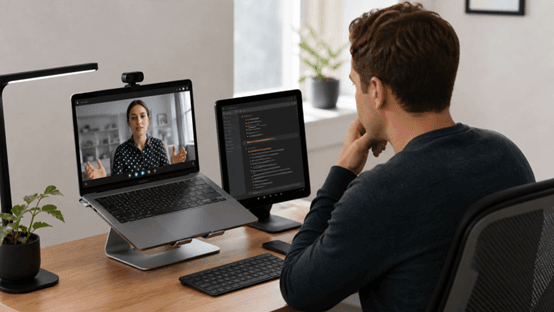
Why a Second Screen Is Becoming the Smart Candidate’s Secret Weapon
Remote interviews have quietly rewritten the playbook. It’s no longer just about memorizing polished answers—it’s about how effectively you can access, organize, and deliver information in real time. Under pressure, even well-prepared candidates can lose their train of thought. A second screen changes that dynamic. It gives you a subtle support system: a place for structured notes, key reminders, and quick mental resets that help you stay composed without interrupting your flow.
When set up correctly, this isn’t about “cheating”—it’s about reducing cognitive load. Instead of trying to recall everything perfectly, you create a controlled environment where your attention stays focused on the conversation. You can maintain steady eye contact, respond more confidently, and avoid those awkward pauses that often come from searching your memory under stress. The result feels natural to the interviewer, even though you’re operating with an extra layer of support.
That said, the difference between smart and suspicious is surprisingly small. If your screen is placed poorly or your eye movements feel unnatural, it can quickly break the illusion. Recruiters are trained to notice subtle behavioral cues, and even a slight mismatch in gaze or timing can raise concerns. That’s why setup matters just as much as preparation.
In this guide, you’ll learn how to position, use, and integrate a second screen seamlessly into your interview workflow—so it enhances your performance without drawing attention. Done right, it becomes invisible. And that’s exactly the point.
What Interviewers Actually Notice (And What They Don’t)
Before you start optimizing your setup, it’s important to understand how interviewers actually perceive you on camera. Most aren’t scrutinizing every tiny movement. Instead, they focus on a few high-level signals: how consistently you maintain eye contact, how quickly you respond, and whether your overall presence feels confident and composed. These cues shape their impression far more than any minor technical detail.
That said, while interviewers don’t track your gaze with precision, they are highly sensitive to patterns. If your eyes repeatedly shift too far off-screen, or if your answers consistently come with a noticeable delay, it can create a subtle sense that something is “off.” The goal isn’t perfection—it’s natural consistency.
Key Signals That Raise Suspicion
Looking too far left or right repeatedly
Long pauses before answering simple questions
Reading responses in a flat, monotone voice
What Usually Goes Unnoticed
Slight eye movement near the camera
Brief, natural downward glances
Smooth and fast response transitions
The takeaway is simple: your setup shouldn’t try to eliminate movement entirely—that often looks unnatural. Instead, it should reduce exaggerated or repeated movements, allowing your behavior to feel effortless and authentic while still giving you quiet support behind the scenes.
Choosing the Right Second Screen Setup
Not all second screens are created equal. The goal isn’t just to have more space—it’s to reduce the physical and visual distance between your camera and your reference material. A well-placed screen allows you to glance naturally without breaking engagement, while a poor setup makes even small movements feel obvious.
Best Hardware Options
A small tablet placed directly next to your laptop camera
A vertically aligned second monitor positioned at eye level
A phone mounted just below or beside your webcam
Each of these options works because they keep your reference point close to your natural line of sight. The less your eyes need to travel, the more seamless your behavior appears on camera.
What to Avoid
Large monitors placed far to the side
Screens positioned too low, forcing noticeable downward glances
Physically switching between devices, such as turning your head
These setups create exaggerated movement, which is far more noticeable than most candidates expect. Even if your answers are strong, distracting eye patterns can weaken your overall impression.
Ideal Positioning Rule
Your second screen should sit within a 10–15 degree angle from your camera. If someone recorded your face during the interview, your eye movement should resemble natural thinking—not obvious reading. Small, controlled shifts are acceptable; wide or repeated movements are not.
At this stage, tools like Sensei AI can fit naturally into your setup. Since it detects the interviewer’s questions and generates responses in real time without manual input, it works best as a quick-reference layer. The key is to use your screen as support—not something you depend on word-for-word.
Try Sensei AI for Free
Screen Layout: What Should Actually Be On Your Second Screen
Having a second screen only helps if it’s structured correctly. One of the most common mistakes candidates make is treating it like a document dump—filling it with paragraphs, scripts, or excessive notes. In reality, the more information you add, the harder it becomes to use under pressure. Your goal isn’t to read—it’s to glance, process, and respond smoothly.
The Ideal Layout
Divide your screen into three simple, functional zones:
Zone 1: Key bullet points about your experience
Zone 2: Structured answer frameworks (such as STAR or quick outlines)
Zone 3: Live prompts, keywords, or AI-assisted suggestions
This layout works because it mirrors how you think during an interview: recall, structure, and deliver. Each section serves a specific purpose without overwhelming your attention.
What NOT to Put There
Full paragraphs or scripted answers
Dense blocks of text that require reading
Anything that forces you to pause and scan
If your eyes need more than a quick glance to process the content, it’s already too much. Overloading your screen increases hesitation and makes your delivery feel less natural.
Example Layout Table
Left Side | Middle Section | Right Side |
|---|---|---|
Experience highlights | Situation → Task → Action → Result | Real-time prompts or keywords |
Short phrases, key metrics | Bullet-based structure | Quick reminders or phrasing cues |
Role-specific achievements | Answer flow guidance | Adaptive suggestions |
This kind of layout reduces cognitive load by organizing information into predictable zones. Instead of searching for what to say next, your eyes instinctively know where to look—helping you maintain a steady, confident flow throughout the conversation.
Camera Alignment Tricks That Make Everything Look Natural
A strong second-screen setup can still fail if your camera alignment looks unnatural. This is where many candidates get exposed—not because of what’s on their screen, but because their physical positioning makes every glance feel obvious. Camera alignment determines whether your movements look smooth or distracting.
The “Triangle Setup”
Imagine a small triangle formed by three points:
Your camera
Your natural eye position
Your second screen
The smaller this triangle is, the more natural your eye movement appears. When these three elements are placed close together, even quick glances look like normal thinking or momentary focus shifts rather than reading from another device.
Practical Adjustments
Raise your laptop with a stand so the camera sits at eye level
Position your second screen directly beside or slightly below the camera
Adjust your video window so your face remains centered during calls
These changes minimize large head or neck movements, which are often more noticeable than eye movement itself.
Lighting Matters More Than You Think
Good lighting reduces facial shadows and keeps your eyes clearly visible, which makes small gaze shifts less obvious. Poor lighting exaggerates movement by creating darker eye sockets and harsher contrast.
This is also where tools like Sensei AI become more effective. Because it generates responses quickly after detecting interviewer questions, you can glance briefly, capture the information, and return to eye contact without introducing awkward delays or unnatural pauses.
Practice with Sensei AI
Practicing the “Glance Technique” (This Is What Makes It Work)
A perfect setup won’t save you if your behavior gives you away. What separates candidates who look natural from those who look distracted isn’t the hardware—it’s how they use it. The “glance technique” is what turns your second screen from a risk into an invisible advantage.
The 3-Step Glance Technique
Step 1: Listen fully to the question without looking away
Step 2: Take a brief glance at your second screen (under 1 second)
Step 3: Return your eyes to the camera before you begin speaking
This sequence matters. If you start speaking while still looking at your screen, it immediately feels like you’re reading. The key is to process first, then deliver.
Timing Rule
If your glance lasts longer than the sentence you’re about to say, it becomes noticeable. Short, controlled glances feel like natural thinking pauses. Longer ones create a disconnect between your eyes and your voice, which interviewers pick up on quickly.
Practice Method
Record yourself answering common interview questions
Use your second screen during the recording
Watch for delays, repeated eye shifts, or unnatural pauses
You’ll quickly notice patterns you weren’t aware of at the moment. With a few practice rounds, your timing becomes smoother and more instinctive. Over time, this behavior feels automatic—similar to how experienced speakers briefly check notes without breaking their flow or presence.
Using AI Notes Without Sounding Like a Robot
AI can be a powerful support tool during interviews, but it comes with a risk: sounding unnatural. The goal isn’t to repeat what you see—it’s to use it as a thinking aid. Interviewers can quickly tell when an answer feels scripted versus when it feels genuinely understood and delivered in your own voice.
The “Interpret, Don’t Read” Rule
Treat AI-generated content as prompts, not final answers
Translate ideas into your own words before speaking
Focus on meaning, not exact phrasing
This small shift makes a big difference. Instead of sounding like you’re reciting, you come across as someone who understands and adapts information in real time.
Personalization Layer
Connect each answer to your own past experience
Add specific details, metrics, or outcomes
Adjust tone based on the role and company
Even a well-structured answer feels generic without personalization. The more you anchor responses in your own story, the more credible and memorable they become.
Where Sensei AI Fits In
Sensei AI detects interview questions in real time and generates tailored responses based on your uploaded resume, making its suggestions more aligned with your background. Because it operates hands-free, you can stay focused on listening and responding instead of managing tools during the conversation.
Additionally, its AI Playground can be useful before interviews. You can refine how you phrase answers, experiment with different response styles, and build confidence in a low-pressure environment before stepping into the actual interview.
Try Sensei AI Now!
Common Mistakes That Instantly Give You Away
Even a well-designed setup can fail if small behavioral errors creep in. These mistakes are often subtle, but they create patterns that interviewers can quickly notice. In most cases, it’s not the second screen itself that causes issues—it’s how predictably or awkwardly it is used during the conversation.
Top Mistakes
Reading full sentences directly from your screen
Looking in different directions for different questions
Delayed responses after every interviewer prompt
Over-relying on AI suggestions without rephrasing
These behaviors create inconsistency in your delivery. Even if your answers are correct, the flow feels unnatural when each response follows the same mechanical pattern.
The “Too Perfect” Problem
If every answer sounds overly structured, evenly paced, and identical in tone, it can raise suspicion. Real conversations naturally fluctuate—some answers are concise, others are more detailed, and pacing changes depending on the question. When everything sounds uniformly polished, it becomes less believable.
Quick Fix
Use short prompts instead of full scripted answers
Allow natural variation in tone and structure
Prioritize fluidity over perfect formatting
The key is to stay adaptable. A slightly imperfect but natural response is far more effective than a perfectly structured one that feels rehearsed.
Ethical Use: Where to Draw the Line
There is an important boundary in using a second screen effectively: support versus dependence. A second screen should function like structured notes in a presentation—helping you organize thoughts, not replacing your ability to think through answers in real time. Once it becomes a crutch, it stops being an advantage and starts becoming a weakness in disguise.
If you cannot answer a question without constantly looking back at your screen, the issue is no longer technical—it is preparatory. The tool is not the problem; the lack of familiarity with your own content is. At that point, no setup can fully compensate for insufficient understanding.
A simple rule helps keep this balanced: if your second screen suddenly disappeared, you should still be able to respond to questions at a reasonable level. The screen enhances clarity, but it should never be the source of your thinking.
The Goal Isn’t to Hide, It’s to Perform Better
A second screen is not designed to bypass interview expectations—it is meant to reduce cognitive pressure and improve clarity when it matters most. When used correctly, it does not stand out because your behavior remains natural and fluid, not because you are trying to conceal it.
Strong candidates do not depend on tools blindly. Instead, they integrate them into their workflow in a way that supports communication and decision-making without interrupting presence or confidence.
Ultimately, the effectiveness of your setup is measured by one thing: whether it strengthens your performance without taking control of it. If it supports your thinking instead of replacing it, then it is being used correctly.
FAQs
Can interviewers tell if you are using a second screen
In most cases, interviewers cannot directly tell whether you are using a second screen. What they can notice, however, are indirect signals such as unnatural eye movement patterns, repeated long glances away from the camera, or inconsistent response timing. If your behavior stays natural and your attention returns smoothly to the camera, the setup remains effectively invisible.
What is the best device for a second screen
A small tablet or a smartphone placed close to your webcam is usually the most discreet option. These devices allow you to keep your reference material within a minimal eye range, reducing noticeable gaze shifts. Larger monitors positioned far away tend to increase visible head movement, which can make the setup easier to detect.
Is it okay to use AI during interviews
It depends entirely on how it is used. If AI is supporting your thinking by helping you structure ideas or recall key points, it can be acceptable. However, directly reading pre-written answers from AI output is risky, as it often results in unnatural delivery and reduced authenticity in your responses.
How do I practice using a second screen
The most effective method is to simulate real interview conditions. Record mock interviews while using your second screen, then review your eye movement, response timing, and speaking flow. Over time, this helps you identify unnatural patterns and gradually develop smoother, more natural behavior under pressure.
Shin Yang
Shin Yang est un stratégiste de croissance chez Sensei AI, axé sur l'optimisation SEO, l'expansion du marché et le support client. Il utilise son expertise en marketing numérique pour améliorer la visibilité et l'engagement des utilisateurs, aidant les chercheurs d'emploi à tirer le meilleur parti de l'assistance en temps réel aux entretiens de Sensei AI. Son travail garantit que les candidats ont une expérience plus fluide lors de la navigation dans le processus de candidature.
En savoir plus
Série de tutoriels : Présentation de notre nouvelle extension Chrome Listener
Sensei AI vs Interviewing.io: Which Interview Tool Is Better for You in 2026?
Sensei AI vs Huru: Which AI Interview Tool Is Better in 2026?
Sensei AI vs Interview Warmup: Which Interview Practice Tool Is Better in 2026?
How Recruiters Detect AI Answers (and How to Stay Authentic)
Interview Copilot vs Traditional Interview Coaching: Which Is Better for Your Next Interview?
Best AI for Behavioral Interview Questions: 9 Tools to Practice Smarter in 2026
Google Interview Warmup Alternatives: 9 Best Tools to Practice for Interviews in 2026
How to Practice for an Interview by Yourself: A Step-by-Step Guide That Actually Works
Best AI Tools for Job Seekers in 2026
Sensei AI
hi@senseicopilot.com